
A custom storefront, with Shopify still behind it
Headless Shopify means your shoppers see a custom-built, fast website while Shopify keeps running your products, cart, checkout, payments, apps and admin. Your team keeps working in Shopify exactly as before. It is a real investment, so this page covers when it pays off and when it does not.
Consultants In A Box is an independent consultancy. We are not affiliated with, endorsed by, or sponsored by Shopify. Shopify is a trademark of Shopify Inc.
Everything the shopper sees, built for speed
The storefront is ours to design and build. The business logic stays in Shopify, where your team already manages it.
Custom storefront
Home, collection, product and content pages designed around your products and customers, not around a theme's limits, and built to load fast on phones.
See moreSearch, filters & navigation
Site-wide search, filters and menus organized the way your customers shop, for example by product type, brand, size or color.
See moreContent & buying guides
Guides, comparison and brand pages written to answer real questions, which helps shoppers decide and helps you rank for how-to searches.
See moreShopify cart & checkout
Carts are created through the Storefront API and shoppers finish on Shopify's own checkout, so payments, discounts and taxes work as they do today.
See moreApps re-connected
Reviews, email capture, analytics and other apps wired into the new storefront through their APIs, or replaced where they only work inside a theme.
See moreSEO & redirects
Every old URL mapped, redirects in place, structured data and sitemaps rebuilt, and search performance checked after launch.
See moreYour storefront in front, Shopify behind
The storefront asks Shopify for products and prices through the Storefront API, builds carts the same way, and hands shoppers to Shopify checkout to pay.
When headless is worth it, and when it is not
We would rather talk you out of a rebuild than sell you one you do not need.
Usually worth it when
- You have a large catalog, thousands of products or collections, and theme pages are slow however much you tune them.
- Search traffic matters and you want full control over page structure, content and internal linking.
- Your design or shopping experience needs things a theme fights against, such as complex filters, guides or comparison pages.
- You already tried theme speed work and hit the limits of what a theme plus your apps allows.
- You are ready to budget for ongoing care of a custom storefront.
Probably not worth it when
- Your catalog is small and a good theme with some speed work would get you most of the way.
- Your team relies on the theme editor to change pages every week and does not want a new way of working.
- Several storefront apps you depend on have no API or headless option.
- The real problem is traffic, pricing or follow-up rather than the website itself.
- You need something live in a few weeks on a tight budget.
Higher build and care cost
A custom storefront costs more to build than a theme and needs a developer to change its layout. Plan for ongoing care, not just launch.
Storefront apps need work
Back-office apps carry on. Apps that inject code into a theme must be connected through their APIs or replaced, which we check up front.
No theme editor
Shopify's drag-and-drop theme editor does not apply. Content is edited in Shopify fields or a CMS we set up, and layout changes go through us.
Checkout stays on Shopify
That is a strength: payments, Shop Pay and order handling are Shopify's. It also means checkout pages follow Shopify's own customization rules.
We have done this for a store with 3,700 products
The Porch Swing Store sells outdoor furniture. We rebuilt its storefront as a custom, fast headless site with Shopify still running the catalog, cart and checkout. Same tests, before and after:
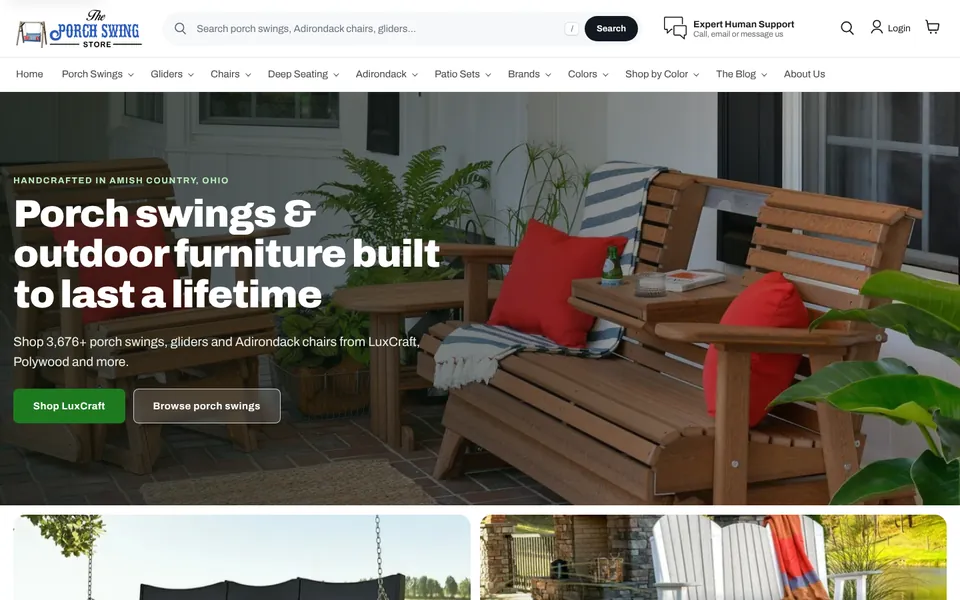
The Porch Swing Store: before and after
Google Lighthouse lab tests, the engine behind PageSpeed Insights, run on the old and new storefronts. Test the live site yourself
How a headless migration works
Your current store keeps selling the whole time. The switch happens only when the new storefront has been tested with real orders.
- Audit the current storeWe list every page type, URL pattern, app, tracking tag and integration, and record speed and search baselines so we can compare after launch.
- Decide what moves and what staysTogether we agree which apps carry over, which get replaced, where content will be edited, and how URLs will be structured.
- Build on stagingWe build the storefront against your real Shopify catalog on a private staging address, so you review it with your own products and prices.
- Connect cart, checkout & appsCart and checkout handoff, customer accounts, reviews, email capture, analytics and conversion tracking are connected and tested end to end.
- Map URLs & redirectsEvery old URL gets a home: kept where possible, redirected where not, with sitemaps and structured data regenerated.
- Launch & measureWe switch the domain over, test orders, watch search and errors closely for the first weeks, and report the before and after.
Keeping your search rankings through the move
A rebuild is the moment rankings are most at risk. These are the checks we run on every headless migration.
- Full URL inventoryEvery product, collection, page, blog post and image URL that gets traffic or links, pulled from Shopify, your sitemap and search data.
- Keep URLs where possibleShopify's /products/ and /collections/ paths can be kept, so most important URLs do not change at all.
- One-to-one redirectsAnything that moves gets a permanent redirect to its closest match, never a blanket redirect to the home page.
- Titles, descriptions & structured dataSEO titles and descriptions carried over from Shopify, with product, breadcrumb and organization data rebuilt.
- Sitemaps & canonicalsFresh sitemaps submitted, canonical tags set so filtered and variant pages do not compete with each other.
- Watch after launchCrawl errors, 404s and rankings checked daily in the first weeks, with fixes made the same day.
For more on search, see SEO, Google Business Profile & AEO.
Other ways we help Shopify stores
Headless is one option. Often the better first step is one of these.
Questions about headless Shopify
What does headless Shopify actually mean?
The website your customers see is built separately from Shopify and talks to it through the Shopify Storefront API. Shopify still holds your products, inventory, cart, checkout, payments, customers and orders, and your team still manages everything in the Shopify admin.
Does checkout move off Shopify?
No. Carts are created through the API and shoppers complete their purchase on Shopify's own checkout. Payments, Shop Pay, discounts, taxes, shipping rates and order notifications keep working as they do today.
Will our apps still work?
Apps that work in the Shopify admin or on the back end, such as fulfillment, inventory, accounting and most email platforms, keep working. Apps that add features to the storefront by injecting code into a theme need to be connected through their own APIs or replaced. We check every app during the audit, before you commit.
Can we still edit pages ourselves?
Yes, but not with Shopify's theme editor, which only works with themes. We set up a content system your team can edit, often using Shopify's own metafields and metaobjects or a separate CMS, and train your team on it.
Is headless more expensive than a theme?
Yes. The build costs more, and the storefront is custom code that needs looking after. That is why we recommend it only when the gains, usually speed, flexibility and search traffic on a large catalog, are worth more than the extra cost.
Will we lose our Google rankings?
Not if the move is handled carefully. We map every old URL, keep URLs where we can, redirect the rest, rebuild sitemaps and structured data, and monitor search closely after launch. On The Porch Swing Store we redirected 555 old URLs and launched with zero broken internal links.
How long does a headless build take?
It depends on catalog size, the number of page types, content and apps. We give you a timeline after the audit, once we know exactly what has to move.
Wondering whether headless is worth it for your store?
Start with the free business analysis. It measures your store's speed and search visibility today, so the decision is based on numbers rather than a hunch.